Welcome to HPR.
- About HPR.
- Contact.
- In the Press.
- So you want to record a podcast.
- Requested Topics.
- Stuff you need to know.
- Recording a Podcast.
- Please promote HPR.
- Picking a slot for your show.
- Adding an Episode.
- Scheduling Guidelines.
- The reserve queue.
- Workflow.
- Frequently Asked Questions.
About HPR.
The HPR Community.
What differentiates HPR from other podcasts is that the shows are crowd sourced from the community - fellow listeners like you. There is no restriction on how long the show can be, nor on the topic you can cover as long as they are not spam and "are of interest to Hackers". If you want to see what topics have been covered so far just have a look at our Archive. We also allow for a series of shows so that hosts can go into more detail on a topic.
You can download/listen to the shows here
or you can subscribe to the show in your favorite podcatching client
to automatically get our new shows as soon as they are available.
You can copy and redistribute the shows for free provided you adhere to the
Creative Commons Attribution
History.
Hacker Public Radio (HPR) is an Internet Radio show (podcast) that releases shows every weekday Monday through Friday. HPR has a long lineage going back to Radio FreeK America, Binary Revolution Radio & Infonomicon, and it is a direct continuation of Twatech radio. Please listen to StankDawg's " Introduction to HPR" for more information.
Free Culture.
Hacker Public Radio is dedicated to sharing knowledge. We do not accept donations so please consider supporting our patrons. If you listen to HPR, then we would love you to contribute one show a year. Our shows are by default released under a Creative Commons Attribution-ShareAlike 4.0 International (CC BY-SA 4.0) license. All the software we use is Free software. All the code we develop is published in our gitlab repository. All the media is available via the feeds.
Governance.
HPR is entirely community driven. Policy decisions are proposed and discussed on the Mailing list, which is open to anyone to join. Mailing list discussions are brought to the attention of the listening community on the first Monday of the month in the HPR Community News show. This show is also open to anyone to participate in. The schedule for the Community News shows can be downloaded as an iCal calendar containing recording dates for the next 12 months. A reminder is also sent to the mailing list in the week before the recording.
Our hosting is kindly provided to us by Josh Knapp from AnHonestHost.com, and he has the last word in issues related to site security. A changing team of volunteers called the "admins" or "Janitors", deal with the day to day operation of HPR. Acting as the first point of contact, processing the shows, coordinating policy discussions, removing spam, updating the website, etc. They are contactable via the email account admin @ HPR. They have no more say over policy than anyone else. Anyone who has shown a long term dedication to the project and is trusted by the community, can become an admin.
See the section stuff you need to know for more information.
Recent Policy Changes
- HPR will move #oggcastplanet on libera, and we will also include links to the matrix, and Mastodon channel
- Existing shows will be flagged with the current version and new shows will default to "Attribution 4.0 International (CC BY 4.0)"
- The Intro Outro will be changed and the upload form will remove the option to add intro and outros.
- Removal of "by arranged permission" when posting to HPR
Please support our Patrons.
Our hosting is kindly provided by Josh from AnHonestHost.com. We would appreciate it if you could donate to help reduce his costs in funding the hosting. He is also accepting bitcoins to 1KsxJr9HtsdaUeU7yaV9bk9bQi21UPBtUq
Please also consider supporting the https://archive.org/donate/ who are now hosting our media files.
Contact.
We are always looking for more hosts...
- email: admin -at- hackerpublicradio org
As an anti-spam measure you will get an error back but we do get your email. - Website: https://hackerpublicradio.org/
- Maillist: Mailing list
- #oggcastplanet
- Linked-In
- iTunes
Mail List
HPR is governed by the community, so decisions about how Hacker Public Radio should be run are made on the mailing list you can join it by going to :
https://hackerpublicradio.org/maillist
In the Press.
- 2019-10-18: Top 10 Hacker Podcasts You Must Follow in 2019 (Archived)
- 2018-08-01: Review: The Linux Podcast Scene - all the movers and shakers (Archived)
- 2016-06-26: 11th Podcast Awards (Archived)
- 2016-05-18: Ten Security Podcasts You Should Be Listening To by Lauren Cooke in Endpoint Security News (Archived)
- 2016-01-18: Information Security Podcast Roundup: 2016 Edition from TripWire.com (Archived)
- 2014-12-09: podcasts that don't suck, 2014 edition (Joey Hess)(Archived)
- 2014-06-30: Free software on Hacker Public Radio by Bryan Behrenshausen (Red Hat)(Archived)
- 2014-04-19: 10 Useful Places Hosting Informative Podcasts On Linux (Archived)
- 2014-04-11: Hand-picked audio podcasts for Linux users by Milosz Galazka (Archive)
- 2013-10-11: Illuminating Linux Podcasts by Dan Petersen (Archive)
- 2012-12-24: 10 Great Podcasts for Linux & Open Source Geeks by Rebecca "Ruji" Chapnik (Archived)
- 2011-08-01: Linux Format: Pick the perfect geek podcast in our roundup by Mayank Sharma in Linux Format Magazine(Archive)



How to Help.
Hacker Public Radio is a communty podcast where the shows are provided by the community, and is also governed by the community, and we rely on the support our Patrons to provide the hosting infrastructure.
Submit a show
One of the best ways to help out is to contribute a show. You can find out everything you need to know here.
Suggest Topics
If there is a technical topic you would like us to cover, or if you are looking for topics to record a show on, then look no further than our Requested topics page.
Podcatcher Support
Please report your experiences with our feeds to https://hackerpublicradio.org/about.html#contactadmin@hpr.
Other ways to help
You can help by:
- Spreading the word
- Creating a HPR page on wikipedia
- Listen to the shows and add constructive comments
- Attending the Community News monthly show
- Participate in the community channels
- Submitting a show
- Getting others to contribute a show
- Suggesting show topics
- Representing HPR at a local meetup
- Producing Stickers/Banners merch
- Paying the domain costs
- Supporting Mumble hosting
- Locating and fixing bugs on our gittea repo
- Improving the documentation on our gittea repo
- Support our Patrons
Download Archive.
Please be aware that our Archive exceeds 62Gb (Ogg: 21Gb, Spx: 16Gb, mp3: 25Gb). We are happy for you to download them, but please make sure that you are not going to incur additional bandwidth charges on your side.
We will be happy to post you the episodes on physical media anywhere in the world if bandwidth is an issue.
Full Episode Guide
The compete episode guide is available to you, and it lists all the shows on one page going right back to the very first episode.
Command line download
You can download the audio of the episodes directly from the command line using the following commands:
- ogg:
curl './eps/hpr[0001-].ogg' -o "hpr#1.ogg" - spx:
curl './eps/hpr[0001-].spx' -o "hpr#1.spx" - mp3:
curl './eps/hpr[0001-].mp3' -o "hpr#1.mp3"
So you want to record a podcast.
Well you've come to the right place. Our goal here at HPR is to make it as easy as possible for you to get a podcast released. We take care of the hard bits so you don't need to. Recording your first show is always a daunting prospect but hundreds of people like yourself have done it and so can you.
1. Stuff you need to know.
- HPR will stop as a project if there are not enough Shows.
- We do not syndicate shows not produced for HPR.
- You are agreeing to license your show CC BY-SA 4.0.
- You have permission to redistribute your show in its entirety.
- Your audio will not be moderated.
- Your show will be signaled as containing explicit content.
- You determine where in the schedule your show will be released.
- We use UTF-8 end to end.
- Your show will be heard by an International Audience.
- We also need reserve shows.
- You will no longer be allowed to edit HPR pages on Wikipedia.
2. Select a Topic.
The first thing you will need to do is decide on a topic for your show. You might already have an idea but if not you can have a look at our Archive page for examples of shows people have recorded in the past. You can also look at our Requested Topics, or our Series page to see if you can add your knowledge to the pool.
If you are worried that your show may not be of interest to Hackers then you can click here to check if it is.
If you can't think of anything to talk about then please just record a show telling us how you got into tech as a way to introducing yourself to the community.
3. Record your show.
Please select more detailed information on how to record a show:
- Recording with a portable media player.
- Recording with a smart phone.
- Recording/Editing using your Computer.
- Recording Interviews with the Phone.
- Recording round table discussions.
- Avoid Bedding/background music.
- We mix down to Mono.
- No need to add Metadata to the file.
Don't forget to introduce yourself in your show.
4. Upload your show.
Once you have your audio ready you can post your show by going to the Calendar page or press the ⇧Upload⇧ button.
After you have selected a date you will be redirected to the request page, where you will be asked to select your show and email address. We will send a link to where you can upload your show to this address and so it must be a valid working address that you can access quickly. We intend to use GPG to speed up the validation of hosts, so you may wish to use an email address that has an associated public key available on public key servers.
Questions ?.
Got any questions not covered here, then just email "admin" at "HPR",
and we'll get in touch with you with all you need to know about getting your show published.
You can chat with other podcasters using IRC in the #oggcastplanet channel on the
libera.chat network.
Follow us on Mastodon (use the tag #hpr)
and on Twitter (use the tag #hpr).
We have a Facebook and
LinkedIn group,
so please join and spread the word.
Still Nervous.
Fellow listeners like yourself contribute the shows and so we all know how hard it is to do that first show. You're probably worried that we won't like the topic. Well don't be, have a look at our Archive to see how diverse the contributions have been. You're probably worried about the quality of your audio, that you sound funny, that English isn't your native language, that you suffer from a speech impediment, that your show has loads of ummms and awws in it, well don't be. We have plenty of hosts that fall into all these categories but continue to produce great shows.
At the end of the day the show is about the content and not the quality of the audio.
That's not to say we won't help you with ways to improve the audio if you wish, or narrate your script if you can't
or won't record it yourself.
Drop into the IRC channel #oggcastplanet where there are
people who will help.
Our Mottos
Any audio is better than no audio.
Any topic of intrest to hackers.
It ain't a show unless it's on the server.
If you tell us you are doing a show, then you owe us a show.
You don't need anyones permission to upload a show, but if you have any questions then drop into the #oggcastplanet channel on libera.chat and chat with a live person 24/7.
Requested topics.
This is a list of topics that have been requested by the community. Feel free to add it to the list by emailing admin at hpr or by tweeting us on @HPR.
- How did you get into podcasting/linux/geekdom?
- What podcasts you listen to and can recommend
- What's in your bag? Tell us what tools/gear/stuff you keep close at hand.
- What got you into Linux?
- Your favorite Android applications.
- Your favorite desktop applications.
- Your favorite browser extensions.
- A introduction to Wireshark.
- How to set up your own blog.
- Choosing a artistic design for website, business cards etc.
- Music Theory
- Installing a VPN to your home network
- Init and System.d
- Episodes for the LPI, or the Networking series.
- Beginning Audio Series for HPR and OSMP Release
- Hackintosh computers - what are they, why would you want one.
- Grub 2.0 introduction and customization.
- FM Transmitter hack to listen into internet streams
- How I Got Into Accessible Computing
- How to do knitting
- How to build a house
- Bitcoin howto hpr0788
- How to solder hpr1037, hpr1047
- How to weld
- How to fix a car
- Reviews of stream playing software, (for linuxheads who don't want to keep a browser tab open all the time)
- Reviews of stream ripping software on linux
- Beginners guide to gnuplot
- Nagios series, intro, setup, advanced ...
- How to set up GPG/openPGP
- What I do with my Raspberry Pi
- It broke, I fixed it
- How does coreboot work
- Introduction to HAM Radio
- I've moved and they do it like this here
- How to record a tag team tutorial on a topic
- Open Street Map new editor
- etymology
- functional versus procedural programming
- sed, awk and grep
- Setting up imap/smtp (gmail) in a cli mail program
- Irssi - a sane setup
- Your view of the future
- Alternative uses for Bayesian email classifiers (more info)
- How to use a multimeter, and other basic electronic components like a 555 timer
- How does Hubble remain fixed on a spot in space while in orbit of the earth
- Gnu automake system.
- What's the deal with IPv6 (i.e., why can't we just NAT at the ISP level, are there privacy issues in having your MAC address as part of your IP?)
- Network like a Pro. If you were to treat your home network like a corporate server farm, what tools and hardware would it entail to treat your home network like a security professional? What do we need for a firewall and what are the detection/prevention technologies that we could be implementing?
- Beyond Firewall and an IDS/IPS, what do I need? I've started listening to Security Weekly, starting with last December, and at one point the suggested a secondary IDS, behind the firewall, to record what the primary defenses missed. Where and how do I set that up? Beyond firewall and IDS, what other tools should I be running, where should they be in my network, and how many physical boxes are we talking? Emphasis should be on low power devices and free as in beer tools.
- Now That Your Security is in Place, How to Read Logs and Formulate a Response to an Intrusion. What I've learned from SW, is that you can't prevent an intrusion, it's how to respond when you are compromised. Again, according to SW, the security manager's job is to detect intrusions, inside 48 hours rather than 48 months. How can you protect your proprietary data and customer database?
- What Are the Answers I Need, To the Questions I Don't Know Enough to Ask?
- #IPFS (and don't leave out IPNS!). I'd really like to get a better understanding of practical use of this.
- Any experiences integrating Dell/Wyse thin- and zero- clients into linux networks.
Stuff you need to know.
This is some important information that you will need to know before uploading to HPR.
You will no longer be allowed to edit HPR pages on Wikipedia .
Once you upload a show, you will no longer be allowed to create or edit pages relating to
Hacker Public Radio in
Wikipedia.
See our FAQ about
the HPR Wikipedia page for more information.
All policy decisions are made by the HPR Community .
The community decides the HPR policies. Please join the HPR Mailing List to participate.
HPR will stop as a project if there are not enough shows .
Hacker Public Radio is dedicated to sharing knowledge. We release about 260 shows a year, which is probably more than all of the other FOSS podcasts put together. If you listen to HPR, then we would love you to contribute one show a year. Remember once that all the reserve shows have been used up and there are no more shows in the queue, HPR as a project will stop.
Support our Patrons.
Our hosting is kindly provided to us by Josh Knapp from AnHonestHost.com, and The Internet Archive at Archive.org. We encourage you to support our Patrons. Over the years kind people have donated services and supported equipment for our conferences.
We do not syndicate non HPR Shows.
HPR is founded on the principle of Hackers sharing knowledge. For this reason we are only releasing material created exclusively for HPR. We will continue to promote new podcasts and other creative commons material, but if you wish to have your show promoted, then please contact our sister site Free Culture Podcasts.
That said, if there is a piece of creative commons content that you would like to promote, then feel free to record a regular show. There you can introduce the content and explain why it is important, providing links to where we can get more information etc., and then include one example episode.
You are agreeing to license your show CC-BY-SA.
All our shows are now released under a Creative Commons Attribution-ShareAlike 4.0 International (CC BY-SA 4.0) license, which means that while you continue to retain the copyright to your show, you are allowing us (and everyone else) to use it provided we give you attribution and that we release it under the same license. Click the link for more information.
You have permission to redistribute your show in its entirety .
Never include content, for example music, in your show that you do not have permission to redistribute. Try to avoid using any content in your show that can not be redistributed under a Creative Commons Attribution-ShareAlike 4.0 International (CC BY-SA 4.0) license. If you are redistributing under another Creative Commons license, GNU Free Documentation License, public domain, or FLOSS software license, then please signal that when you upload your show. We do not post other copyrighted content, even if it is made available under fair use, or by arranged permission.
The audio of your show will not be moderated.
We do not vet, edit, moderate or in any way censor any of the audio you submit, we trust you to do that.
Aside from checking snippets for audio quality/spam checking,
we have a policy that we don't listen to the shows before they are aired.
This is a long standing tradition arising from the fact that HPR is a community of peers
who believe that any host has as much right to submit shows as any other.
We do transcode the audio into different formats.
Please note that this only relates to the audio you upload. The rest of the meta-data (branding/summaries/tags/show notes/etc.), are managed by the HPR Community, and may be edited. The show hpr2210 :: On Freedom of Speech and Censorship describes the agreed approach to this topic.
Your show will be signaled as containing explicit content .
Given that we are an open forum for free speech we signal all our shows as "explicit" with the assumption that the listeners will apply the required discretion when playing the shows in public. That said the majority of our content is technical in nature and therefore is often considered appropriate for any audience. If you feel that your show will be considered inoffensive in every region of the world then you can signal that when you upload the show.
When dealing with content that is "explicit" or contains material that would best be suited for a mature audience, it has become traditional to include a short warning at the very beginning of the show before the intro, to allow listeners time to switch off the episode should they so desire.
hpr2210 :: On Freedom of Speech and Censorship describes the agreed approach to this topic.
You determine when your show will be released.
The HPR Schedule is entirely community driven and we recommend that you pick the date or show number as then you know when your show will be released. However the slots will only be allocated once the shows have been successfully processed. Any missing information can result in a show missing the requested slot. Once the slots have been allocated it is not possible to move them.
All reservations need to be approved.
Any host can select any free slot a up to year in advance. However the audio must be ready at time of picking a slot so that it can be upload immediately afterwards.
In exceptional circumstances it may be necessary to reserve a slot while not having the audio available, but this must be approved by the HPR Mailing List in advance. Be sure to allow as much time as possible, and include a reason why you feel it is necessary to reserve the slot.
This is intended only for exceptional circumstances, such as a scheduled interview where we would like the audio to be released as soon after the event as possible, or to cover an important topical situation that has occurred. Due to the extended time now needed to post shows to external sites, the extra work this entails and the disruptive effect of reservations, we will no longer be allowing them except in very rare cases of the type mentioned above.
The following are standing reservations:
- Anniversary episodes.
- HPR Community News on the first Monday of the month.
- The first day of the fourth month.
- The days following new year.
We use UTF-8 end to end.
See the video "Characters, Symbols and the Unicode Miracle - Computerphile" for an interesting background to ASCII and UTF-8.
Keep accessibility in mind.
When you includes output from the command line in the show notes, posting screen-shots of console or terminal output
makes it impossible for screen readers to access the text.
Always try to include the raw output ( eg: embedded in <pre> tags)
Include descriptive language in any link texts.
Avoid structures like: "For accessibility information click
here"
Rather use: "For more information click our
accessibility page"
Your show will be heard by an International Audience .
We have people listening from all over the world, who may not have the same cultural background as yourself, therefore you should be as clear as possible when giving details. For example always give temperatures in both Celsius and Fahrenheit, measurements in Metric and Imperial, dates in YYYY-MM-DD iso8601 format, and abbreviations using the NATO phonetic alphabet. Never assume that your audience knows what age a sixth grader is, or how big a 20 Cent Euro coin is. Keep in mind that keyboard layouts are also different so make sure to specify the key shape or the position inrelation to a common known standard. For example:
The at sign normally situated above the 2 key on a US keyboard, and has a unicode number of U+0040. For more information see Wikipedia
Feed the reserve queue.
The reserve queue is intended only to be used in the cases where there is still a gap in the schedule 24 hours prior to release. This was known as the emergency queue, but now can also be used when the hosts don't care when the shows are scheduled. They will be used on a first come first go basis, when there is no conflict with the scheduling guidelines.
Scheduling Guidelines
- You must have your audio recording ready to upload before you pick a slot.
- Always try and fill any free slots that are available in the upcoming two weeks.
- If the queue is filling up then please consider leaving some slots free for new contributors.
- If you have a non urgent show then find a empty week and schedule it then.
- If you are uploading a series of shows, consider scheduling one every two weeks.
- Interviews may be released sooner.
Recording a Podcast
On this page you will find information on how to record a podcast. Our golden rule is Any audio is better than no audio. so keep that in mind. Don't forget to introduce yourself in your show.
Recording with a portable media player .
Many of today's portable media players support recording audio out of the box. Search for "Voice Recorder", to see if there is an application for your smartphone. Whichever option you have close to hand, try and set the recording to the best quality format (WAV or FLAC), and set everything else to the highest setting. It's always the goal to get the best quality audio but here at Hacker Public Radio we value content over quality and so long as it's audible we'll take it.
Then just record your show, request a slot, and we'll do the rest.
Recording with a portable media player.
Some of our hosts recommend Android Audio Recorder on my android phone. It's available on F-Droid and Google Play. These are the recommended settings:
- Recording Source - Unprocessed
- Sample Rate - 44.1 kHz
- Encoding - .flac
- Audio Channels - Mono
Recording/Editing using your Computer.
The majority of podcasters use Audacity. First set the Project Rate to 44100Hz, then you can either record your show in Audacity itself or import the file you recorded earlier and edit it as you wish.
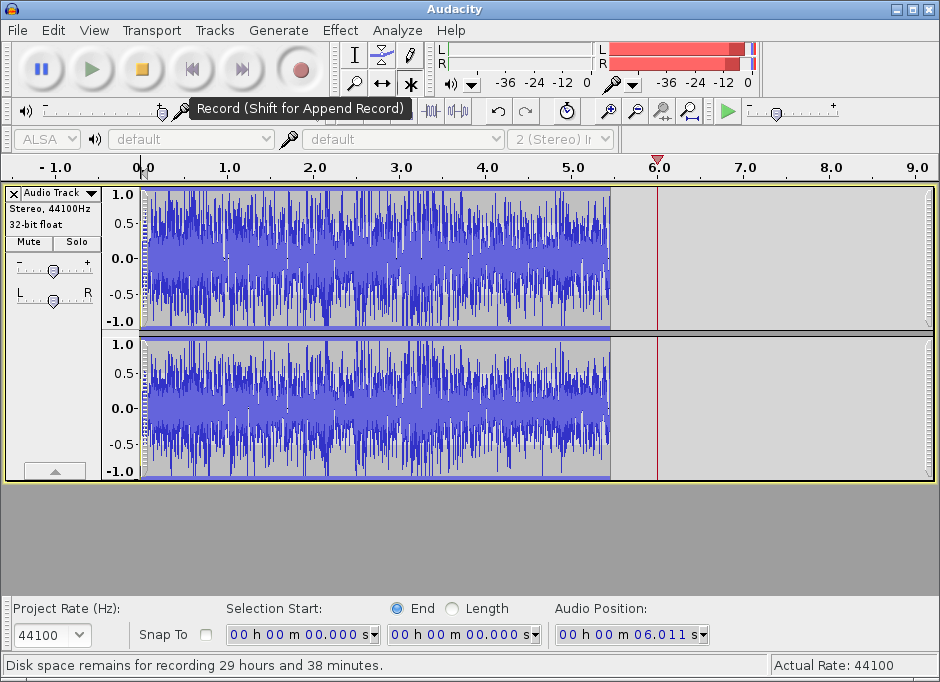
Audacity is a free, easy-to-use and multilingual audio editor and recorder for Windows, Mac OS X, GNU/Linux and other operating systems.
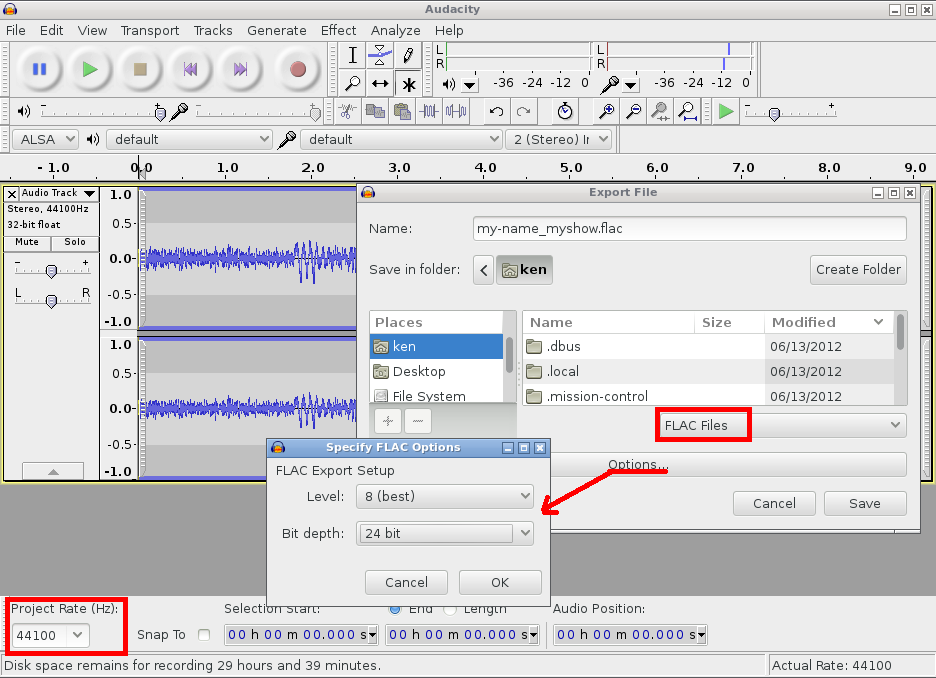
When you have finished editing your podcast you can export it.
- Confirm that the Project Rate is set to 44100 Hz (bottom left).
- File -> Export and select FLAC File.
- Click Options... to reveal FLAC Export Setup.
- Set Level to 8 (best).
- Set Bit depth to 24.
Recording Interviews with the Phone.
If you want to record a one-to-one interview with someone then you can use Skype in conjunction with Skype Call Recorder. If everyone is using skype then it won't cost you anything otherwise you will need to pay for SkypeOut service. Although the quality is usually terrible, you could also put your phone on hands free and record with a portable media player.
Recording round table discussions.
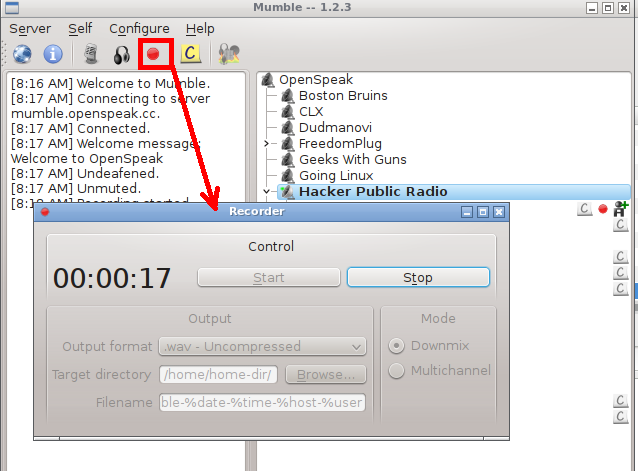
If you would like to record with multiple participants then you can use Mumble.
Connect to chatter.skyehaven.net Port: 64738 .
Walk through the audio wizard and then pop into the Hacker Public Radio room.
Once you are ready press the recording button, select multichannel and then start.
That will record multiple tracks, one for each participant which you can edit and then submit.
Kwisher made a Mumble tutorial
which you might find useful and Delwin
has produced a number of short shows on how to configure the audio quality.
Avoid Bedding/background music.
You may include backing music but it's best if you don't. Most long time podcast listeners speed up their shows,
as this allows them to cram more shows into a day. Having bedding music makes it more difficult to understand,
and prevents tools like truncate silence from working correctly.
Others will convert shows to mono to listen in one ear leaving the other free to carry out their other chores.
Still more slow the shows down so that they can improve their English.
Others are hard of hearing and backing music makes it difficult to understand the text.
We mix down to Mono.
We will by default mix down your show to one channel mono and we will transcode to MP3, ogg and spx formats. If you want to control this in more detail then please email admin at Hacker Public Radio for more information.
No need to add Metadata to the file.
There is no need to add any information to the file as that will be inserted based on the information you fill in when you upload the show.
Please promote HPR.
Feel free to use the promotional material to spread the word in your podcasts, or have them played on to other shows.
General HPR promotion
- Klaatu explains HPR Daily podcast by the Community for the Community
- HPR Promo NewsCast theme by Klaatu
- HPR Promo by Skirlet
- HPR Promo sax theme by slick0
- HPR Promo basenet roll theme by slick0
New Year Promo
Picking a slot for your show
Any host can select any free slot a up to year in advance, by recording their show and uploading it to the desired slot. In exceptional circumstances it may be necessary to reserve a slot while not having the audio available, but this must be approved by the HPR mailing list in advance. Be sure to allow as much time as possible, and include a reason why you feel it is necessary to reserve the slot.
This is intended only for exceptional circumstances, such as a scheduled interview where we would like the audio to be released as soon after the event as possible, or to cover an important topical situation that has occurred. Due to the extended time now needed to post shows to external sites, the extra work this entails and the disruptive effect of reservations, we will no longer be allowing them except in very rare cases of the type mentioned above. [?]
You can post your show by going to the Calendar page. Once you have selected a date you will be redirected to the request page, where you will be asked to select your show and email address. We will send a link to where you can upload your show to this address and therefore it must be a valid working address that you can access quickly. We intend to use GPG to speed up the validation of hosts, so you may wish to use an email address that has an associated public key available on public key servers.
The audio of your show will not be moderated, however the information provided in the upload form may be moderated. All publicly facing material is managed by the HPR Community as a whole, and not just the host providing the show. The show hpr2210 :: On Freedom of Speech and Censorship describes the agreed approach to this topic.
Note: This email address will be published on the HPR website and will be given out in the feeds,
so please use a public email address for this purpose.
Where we publish it we pad it with dot nospam at-sign nospam dot.
i.e. hpr@example.com becomes hpr.nospam@nospam.example.com.
If you do not want to have your email exposed, please contact the admin@hpr team to arrange a alias.
Once you press next, an email will be sent to your email address pointing to where you can upload the show. You need to open the link within 15 minutes or the temporary lock will be released. Once you open the link, you can fill in the information at your leisure. The upload form works on the assumption you will be posting one show at a time, from the same IP address. Once you have pressed submit you will not be able to edit any of the information.
Adding an Episode
The unique link sent by email will allow you to manage both the episode and information about yourself that is displayed on HPR. The following information will be requested:
Personal Information
Remember All information will be displayed publicly. The only exception is that your email address will be sent
in the feed with some anti-spam additions.
For example hpr@example.com will become hpr.nospam@nospam.example.com
- email: already populated
See notes above
- image: Optional
If you have associated a Gravatar image with an email address, then it will be displayed here. Otherwise you can upload a 80x80 image . - Name/Handle: Mandatory
It should be the name you wish to be known as on HPR. It can be your real name, an Internet handle or both. - Your Default license: Mandatory
This field tells us what your work is normally licensed under. All our shows are now released under a Creative Commons Attribution-ShareAlike 4.0 International (CC BY-SA 4.0) license, which means that while you continue to retain the copyright to your show you are allowing us (and everyone else) to use it provided we give you attribution and that we release it under the same license. Click the link for more information. - Profile: Optional
Enter some text about yourself with links to your blog or other online presence.
Your profile information is used on the website, in the RSS feeds, and on social media sites. You can change your profile information at any time, by submitting another show.
Episode Information
- Title: Mandatory
This will be a short descriptive title and will be used everywhere to identify your show. Any valid UTF-8 character is acceptable, but keep the length short and clear. - Summary: Mandatory
This is a short 100 character summary of what your show is about. Please fill this out as it is used once the show has gone off the main page, on the mobile site, on printed brochures, on text to speech announcements, on twitter, Mastodon etc. - Theme: Automatic
The Intro, and the Outro will be added automatically. Please do not add it. - Explicit: Mandatory
See iTunes for more information. - License: Mandatory
All our shows are now released under a Creative Commons Attribution-ShareAlike 4.0 International (CC BY-SA 4.0) license, which means that while you continue to retain the copyright to your show you are allowing us (and everyone else) to use it provided we give you attribution and that we release it under the same license. Click the link for more information. - show notes: Mandatory
It is important to provide good show notes because:- They provide the listeners with more information on the topic.
You have taken the time to record a show on a topic, so many people will want to find out more on the subject, therefore you should include links to give more information. It is not enough to just give it in the show itself as people may be listening while away from the Internet, and they may have forgotten or misheard your links. - They ensure your show gets posted on time.
If you do not supply show notes then your show notes will need to be edited manually by an HPR volunteer and this will most likely result in delays. During that time other shows will be processed and may get posted before your show. It is always better if you send us show notes yourself as you know best what information you are trying to convey. - They encourage people to download your show.
We produce a lot of shows and many people download based on the text in the show notes. If the show notes are not descriptive then it is less likely that it will get as many downloads as other shows with good show notes. - They allow your show to be indexed by search engines.
Search engines cannot determine the content of your show from the audio alone. The only way for your show to be indexed is for you to describe in the associated text what you say in the audio. - They make your show accessible to the deaf and hard of hearing.
Your audio is completely inaccessible to those who have hearing problems, so the only way for your show to be of help to them is if you distill the essence of the show into the show notes. If you are using a script to prepare your show then include that.
- They provide the listeners with more information on the topic.
-
If you wish to include text formatting then please use a format that supports it. We accept:
- HTML5
- Markdown (standard)
- Markdown (GitHub flavoured)
- Markdown (Pandoc flavoured)
- RestructuredText
- txt2tags
- Plain text
It takes us a lot longer to fix incorrectly formatted shownotes than plain text, so please only create formatted show notes if you know what you are doing and are sure that what you are writing is valid. - Show Note Format: Optional
Please tell us which format, if any you used when filling in your shownotes.- HTML5
- Markdown (standard)
- Markdown (GitHub flavoured)
- Markdown (Pandoc flavoured)
- RestructuredText
- Plain text having no formatting.
- Series: Optional
Select the series if any that your show is a part of. - Upload Method: Optional
You have the choice of the following options:
- Upload now via this browser
You can upload single or multiple files using this method. Chrome will display the percentage uploaded but to see this in Firefox you will need to install a plugin, or just wait. - Provide a url for us to get it from
Using this option may cause delays as a HPR volunteer will need to troubleshoot any issues that may occur, and this can result in your show not been posted on time. This must be publicly accessable using a curl or wget command. Please avoid services that require login or downloading via a browser. - Other
The postal information will be sent to you after submission.
If you want to submit an additional file with your show, then put them in a zip, or tgz file. This should expand to a directory with a index.html file that refers to the other files. This will be hosted in the eps directory under a new directory with the episode number.https://hackerpublicradio.org/eps/hpr9999/full_shownotes.htmlhttps://hackerpublicradio.org/eps/hpr9999/other-file.pdfhttps://hackerpublicradio.org/eps/hpr9999/yet-other-file.c ...Ensure that all links are full urls, as relative urls will not work in RSS feeds. Adding additional files will delay processing as they need to be verified manually. - Upload now via this browser
Press submit and your show will be sent to the HPR Volunteers to be processed. Keep an eye on the calendar for when it is posted. Your show information is used to process the media files, on the website, in the RSS feeds, and on social media sites.
Workflow
- REQUEST_UNVERIFIED -
- REQUEST_EMAIL_SENT - email sent
- EMAIL_LINK_CLICKED - pending upload
- SHOW_SUBMITTED - upload complete
- METADATA_PROCESSED - shownotes.{json,txt} processed to html
- SHOW_POSTED - show in the database
- MEDIA_TRANSCODED - audio all generated
- UPLOADED_TO_IA - on the IA and visible
- UPLOADED_TO_RSYNC_NET - archived on rsync.net
Frequently Asked Questions
0.1 What is Hacker Public Radio?
Hacker Public Radio (HPR) is an Internet Radio show (podcast) that releases shows (episodes) every weekday Monday through Friday.
What differentiates HPR from other podcasts is that the shows are crowd sourced from the community - fellow listeners like you. There is no restriction on how long shows can be, nor on the topic you can cover, as long as they are not spam and "are of interest to Hackers".
If you want to see what topics have been covered so far just have a look at our Archive. We also allow for shows to be grouped into series so that hosts can go into more detail on a topic.
Look at the About HPR page for a full description of The HPR Community, Free Culture, Governance and our Patrons.
A question on the mailing list in 2020 asked if HPR is a Content Publication Network like YouTube, or is it a Podcast that random people contribute to? Or to put it another way, is the host addressing the Internet in general or the HPR Audience?
- The consensus of opinion is that HPR is a Podcast contributed to by the community, not a Content Publication Network.
0.2 What is a show?
A show is your audio presentation (which we do not moderate), with an intro, outro, a title and a summary.
The audio is the recording you have made and sent in to HPR.
The intro (introduction) is a piece of audio introducing the show. The components are:
- a synopsis taken from the details submitted with the show (added automatically)
- acknowledgement of our hosting provider (added automatically)
- HPR introduction music (added automatically)
The outro is added automatically. It contains the HPR outro music.
Each show needs a title to describe what it is about.
Similarly, a summary helps to add more information describing the show so a potential listener can decide whether to listen to it or not.
Each show is expected to have certain mandatory attributes listed below.
HPR shows are usually expected to be informative or educational, and as such some sort of accompanying written material is highly desirable. This might consist of brief notes, links to relevant web sites, or possibly longer notes and examples. Photographs, diagrams and example files are also welcome if the host feels it helps to get the message across.
Shows are released under a Creative Commons Attribution-ShareAlike 3.0 Unported license. See Stuff you need to know for much more detail about this and related issues.
As a contributor you can choose when your show will be released. We only release one show a day, during week days, but if a slot is free you can claim it. Go to the calendar page to do this. You need to have your show ready to upload before you reserve a slot though.
0.3 Can I submit a show made for another podcast?
Strictly, no. Shows are expected to have been made exclusively for HPR.
However, we support promoting new podcasts and other creative commons material. If you record a show of your own in which you introduce the other podcast, perhaps explaining why it is important, and giving links to the feed, you may include an example episode.
A series exists Podcast recommendations, which can be used for such shows.
0.4 What defines a show as being "Produced for Hacker Public Radio"?
- If you create material and post it first on HPR then it meets the requirements of "being produced for HPR". That means once you upload it to the HPR server you can publish it anywhere else you like.
0.5 What are the mandatory elements of an HPR show?
See Picking a slot for your show for the full details of how to submit a show and what information is required.
A quick summary of the main components is:
- A show title
- A summary of what the show is about
- The explicit/clean flag
- License
- Show notes
- Tags
- Audio
0.6 What are tags?
We are trying to maintain a collection of tags to allow people to find shows on the same (or similar) topic.
Tags are simple words or short phrases describing aspects of a show such as what topics are covered in it. To get hints about what tags have already been used you can view all the current tags in alphabetical order on this page: Tag summary
Some examples are: android, creative commons and gaming.
Are there any tags that are best avoided?
0.7 Is it OK if I don't include notes with my show?
- Please don't do that. It is important to provide good show notes for reasons described on the
Picking a slot for your show page:
- They provide the listeners with more information on the topic your show is covering
- They ensure your show gets posted on time (the volunteers don't have to make notes for you)
- They encourage people to download your show
- They allow your show to be indexed by search engines
- They make your show accessible to the deaf and hard of hearing
0.8 How do I include photographs or other files with my show?
- TBA
0.9 What is and is not edited in a show after submission?
We don't listen to the audio before posting a show to the website, so we don't change the content.
Unless you have done so and told us you have, we add an introduction to the audio announcing what it is. Similarly we add an outro. This is not editing since we don't change the content.
We may make changes to the show title, summary or tags. Usually these are minor changes such as spelling corrections. The intention is not any sort of censorship, merely to make these items more understandable or easier to index.
Depending on the form the show notes take we may modify these.
- If what is submitted is plain text we convert it to Markdown in order to generate HTML.
- If the notes are one of the permitted markup formats (mostly Markdown flavours) we may adjust this to ensure that valid HTML is generated.
- If the notes are HTML we run them through an HTML checker and correct any mistakes it highlights.
- We may correct spelling, grammar and punctuation if this clarifies anything which might otherwise be unclear.
- If despite the request for show notes of some kind, none are provided, we may add notes which help to clarify the content of the show. This may be done after the show is released (when we have had a chance to listen to it).
We are working on the production of reports about any changes made, which will be sent to the host after we have processed the show.
We may make changes to a show's metadata if the host requests it (see the item on fixing errors after upload).
If a show contains links to resources which disappear after a period of time, we may at some future time change the notes to refer to any Wayback Machine copy that can be found.
0.10 What are some common errors in show notes?
It depends on the note format to some extent:
0.10.1 HTML notes
It's very easy to hand-write bad HTML. That's why we use an HTML checker on it, and fix the errors it reports.
A common fault is to write
<code><pre>to define a pre-formatted block of text using a fixed-width font. However it's illegal because the<pre>tag can't be enclosed in other tags like<code>. Use<pre><code>instead.
0.10.2 Markdown notes
- This is quite a forgiving format. Some people embed HTML in the Markdown, and the HTML used suffers from some of the issues discussed in this document. These are much harder to spot. The HTML checker can't really help unless it's run on the output from Pandoc.
0.10.3 General errors
Spelling is often an issue in notes. As the notes are processed they are edited in the Vim editor with the spell check option turned on. In most cases spelling problems flagged by Vim are corrected.
Grammar and punctuation can also be issues. We do not have very effective grammar checking tools in the note preparation workflow. Modifications may be made to split up extra-long (often comma-spliced) sentences, rationalise the use of capital letters and similar.
0.11 If I notice an error in my show's details how can it be fixed?
The HPR administrators can make changes to show titles, summaries, notes and so forth. Ideally send an email to
adminathackerpublicradio.orgexplaining what the problem is and we'll fix it for you. We'll also ensure that the changes are propagated to the relevant page on archive.org.Don't be tempted to send in your corrections as a comment. Comments are not propagated to archive.org, so people referring to that copy will not see the changes.
0.12
Does hobbypublicradio.com have anything to do with HPR?
Some environments prevent access to sites which use the word
'hacker'or'hackers'in their names (or content in extreme cases). The site nameshobbypublicradio.{com,net,org}have been created, which link to the main HPR site, in order to get around this restriction.See the mailing list thread here: https://lists.hackerpublicradio.com/pipermail/hpr/2015-February/002493.html
0.13 How can I talk to other HPR hosts and listeners?
- You have a number of choices:
- The mailing list hpr@hackerpublicradio.org is where various policy matters are discussed and announcements made. You need to be a member of the list to post to it. Visit the listinfo page to sign up.
- You can join the #oggcastplanet channel on IRC. Visit the freenode.net network to sign up.
- A number of HPR messages may be found on Twitter (tag #hpr) and Mastodon (tag #hpr).
- TBA - Matrix? Telegram?
- An HPR tradition exists where we record a 26-hour show at the turn of the year celebrating the arrival of the New Year around the world. We use Mumble to record the show and anyone can connect to the Mumble server and speak to other HPR listeners and hosts. The recording is used to make multiple shows which are released when they are ready.
0.14 Why has HPR not got a Wikipedia page?
Once someone contributes to Hacker Public Radio, the Wikipedia rules prevent us from editing a page. You can of course create one prior to contributing a show, or ask for one to be created.
We do of course believe that Hacker Public Radio should have a Wikipedia entry. We are one of the longest running podcasts having started as Today with a Techie on 2005-09-19. We also are unique in our community driven approach to producing shows. And of course the fact that Wikipedia itself references us as a source [1], [2], [3], [4], [5]
0.15 I'd like to post a show but I would rather not have my email address published on the site.?
The mail is just a way for us to get back to you if there was an issue posting the show.
If you trust the janitors to know your real email we can just use an alias for you on the web site and have it forward the email to you automatically. That runs the risk that were the redirect list compromised then your real email would get exposed.
If you prefer, we can use the janitor email for your shows with your own host id. Then if any emails come in we can manually forward them at some point. The risk is that you are trusting the janitors to protect your email but again it could be compromised.
In both cases we would do our best to protect your email but we can't guarantee anything.
The other option is to use an a throwaway email, like https://www.guerrillamail.com/ for your show. This will be up for enough time to get the key necessary for to post the show. However keep in mind that we will be very suspicious of any submission done this way and will be checking it in detail, so expect delays in processing.